


As a supplier of Atom Z8350 Android Windows OPS Computers, I often receive inquiries from customers regarding the device's capabilities, especially its support for multiple monitors in a Windows environment. In this blog post, I'll delve into the technical aspects of the Atom Z8350 OPS computer and explore whether it can indeed support multiple monitors in Windows.

Understanding the Atom Z8350 Processor
The Intel Atom Z8350 is a quad - core processor based on the Cherry Trail platform. It operates at a base frequency of 1.44 GHz and can turbo up to 1.92 GHz. This processor is designed for low - power, compact devices, making it a popular choice for OPS (Open Pluggable Specification) computers. OPS computers are standardized, small - form - factor devices that can be easily integrated into digital signage, interactive kiosks, and other display - centric applications.
In a Windows operating system, the ability to support multiple monitors depends on several factors, including the graphics capabilities of the processor, the available video outputs on the computer, and the drivers provided by the hardware manufacturer.
Graphics Capabilities of the Atom Z8350
The Atom Z8350 comes with the Intel HD Graphics (Cherry Trail) integrated graphics solution. This graphics unit is capable of handling basic graphical tasks such as web browsing, video playback, and simple office applications. However, when it comes to multiple - monitor support, the capabilities are somewhat limited compared to high - end discrete graphics cards.
The Intel HD Graphics on the Atom Z8350 supports a maximum resolution of 2560x1600 at 60Hz on a single display. For multiple - monitor setups, the processor can drive up to two displays simultaneously. This means that in a Windows environment, you can connect two monitors to the Atom Z8350 OPS computer and extend or duplicate your desktop across them.
Video Outputs on the Atom Z8350 OPS Computer
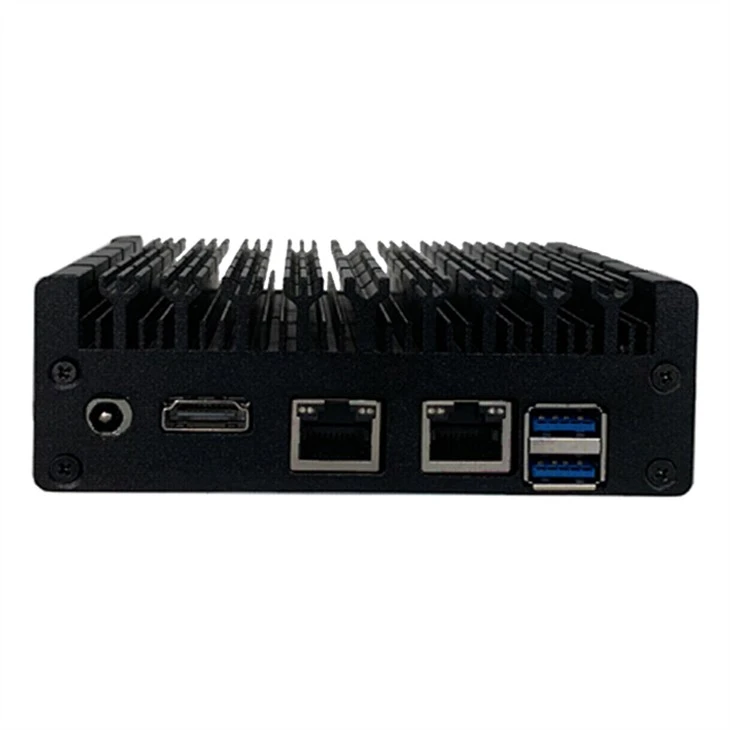
To connect multiple monitors, the computer must have the appropriate video outputs. Most Atom Z8350 OPS computers are equipped with common video interfaces such as HDMI and DisplayPort. These interfaces are widely supported by modern monitors and provide high - quality video transmission.
If your Atom Z8350 OPS computer has both an HDMI and a DisplayPort output, you can easily connect two different monitors, one to each output. Windows will automatically detect the additional monitor and allow you to configure the display settings according to your preferences. You can choose to extend the desktop, which gives you a larger workspace, or duplicate the desktop, which is useful for presentations or when you want the same content to be shown on both monitors.
Drivers and Compatibility
The key to getting multiple - monitor support to work smoothly in Windows is having the correct graphics drivers installed. Intel regularly updates its graphics drivers to improve performance, add new features, and fix compatibility issues. As a supplier, I always recommend that customers keep their drivers up - to - date.
When you first connect multiple monitors to your Atom Z8350 OPS computer running Windows, the operating system will try to install the appropriate drivers automatically. However, in some cases, you may need to visit the Intel website and download the latest drivers manually. Once the drivers are installed, you can use the Windows Display Settings to adjust the layout, resolution, and orientation of each monitor.
Considerations for Multiple - Monitor Setups
While the Atom Z8350 OPS computer can support two monitors in Windows, there are some considerations to keep in mind. First, the overall performance of the system may be affected when running graphics - intensive applications across multiple monitors. The integrated graphics on the Atom Z8350 has limited processing power, so tasks such as gaming or high - definition video editing may not be as smooth as on a system with a more powerful graphics card.
Second, the resolution and refresh rate of the monitors can also impact the performance. If you are using high - resolution monitors with a high refresh rate, the processor may struggle to maintain a consistent frame rate, especially when multiple windows are open and running simultaneously.
Other Products in Our Portfolio
In addition to the Atom Z8350 OPS computers, we also offer a range of other products that may be suitable for your multiple - monitor needs. For example, our Celeron J5005 J4105 J4005 OPS Computer provides enhanced performance and graphics capabilities, which can support more demanding multiple - monitor setups.
Our Standard ATX Industrial Large Motherboard 2 DDR4 ATX Motherboards are ideal for building custom - made systems with multiple monitor support. These motherboards offer a wide range of expansion slots and interfaces, allowing you to connect multiple graphics cards and monitors.
If you are looking for a fanless and compact solution, our 6GEN Core Skylake - U Fanless Aluminum Chassis Mini Computer is a great option. It combines the power of the 6th - generation Intel Core processors with a fanless design, making it suitable for silent and space - constrained environments.
Conclusion
In conclusion, the Atom Z8350 OPS computer can support multiple monitors in Windows, specifically up to two monitors. With the right video outputs, updated drivers, and proper configuration, you can enjoy an extended or duplicated desktop across two displays. However, due to the limited graphics capabilities of the processor, it may not be suitable for highly demanding graphics applications in a multiple - monitor setup.
If you are interested in our Atom Z8350 Android Windows OPS Computers or any of our other products, we invite you to contact us for a detailed discussion about your requirements. Whether you need a single - monitor system or a complex multiple - monitor setup, our team of experts can help you find the best solution for your needs.
References
- Intel Corporation. (2023). Intel Atom Z8350 Product Specifications.
- Microsoft. (2023). Windows Display Settings Guide.




