In the dynamic landscape of computer technology, the I3 OPS (Open Pluggable Specification) computer has emerged as a versatile and compact solution for various applications, from digital signage to interactive kiosks. As a leading supplier of I3 OPS computers, I often encounter inquiries about the presence of Thunderbolt ports in these devices. In this blog post, we will delve into the topic to provide a comprehensive answer and explore the implications for users.
Understanding the I3 OPS Computer
Before we address the question of Thunderbolt ports, let's first understand what an I3 OPS computer is. The OPS standard was developed to provide a standardized interface for integrating computer modules into displays, making it easier to upgrade and maintain the computing capabilities of digital signage and other display systems. An I3 OPS computer typically features an Intel Core i3 processor, which offers a balance of performance and energy efficiency, making it suitable for a wide range of applications.
These computers are designed to be compact and easily pluggable, allowing them to be installed directly into compatible displays. They come with a variety of ports for connectivity, including USB, HDMI, Ethernet, and audio jacks, enabling users to connect to external devices such as keyboards, mice, monitors, and speakers.
Thunderbolt Technology Overview
Thunderbolt is a high-speed interface developed by Intel in collaboration with Apple. It combines the capabilities of PCI Express and DisplayPort into a single cable, offering data transfer speeds of up to 40 Gbps (Thunderbolt 3) and 80 Gbps (Thunderbolt 4). Thunderbolt ports are known for their versatility, allowing users to connect a wide range of devices, including external hard drives, graphics cards, and high-resolution displays.
The benefits of Thunderbolt technology include fast data transfer, support for multiple displays, and the ability to daisy-chain devices. This makes it an attractive option for users who require high-performance connectivity for tasks such as video editing, gaming, and data storage.
Does an I3 OPS Computer Have a Thunderbolt Port?
The answer to this question depends on the specific model of the I3 OPS computer. While some I3 OPS computers may come equipped with Thunderbolt ports, others may not. The presence of a Thunderbolt port is often determined by the motherboard and chipset used in the computer.
In general, I3 OPS computers that are based on older generations of Intel processors or motherboards may not support Thunderbolt technology. However, as technology advances, more and more I3 OPS computers are being designed with Thunderbolt ports to meet the growing demand for high-speed connectivity.
To determine whether a particular I3 OPS computer has a Thunderbolt port, you can refer to the product specifications provided by the manufacturer. These specifications will typically list the available ports and their capabilities. If you are unsure, you can also contact the manufacturer or supplier for more information.
Advantages of Having a Thunderbolt Port in an I3 OPS Computer
If an I3 OPS computer is equipped with a Thunderbolt port, it offers several advantages for users. Here are some of the key benefits:
- High-Speed Data Transfer: Thunderbolt ports provide significantly faster data transfer speeds compared to traditional USB ports. This means that you can transfer large files, such as high-resolution videos and large data sets, in a fraction of the time.
- Multiple Display Support: Thunderbolt ports support the connection of multiple high-resolution displays. This is particularly useful for applications such as digital signage, where multiple displays may be used to create a seamless visual experience.
- External Device Connectivity: Thunderbolt ports allow you to connect a wide range of external devices, including external hard drives, graphics cards, and audio interfaces. This provides users with the flexibility to expand the capabilities of their I3 OPS computer.
- Daisy-Chaining: Thunderbolt ports support daisy-chaining, which means that you can connect multiple Thunderbolt devices together in a single chain. This simplifies the setup and management of multiple devices, reducing the number of cables and ports required.
Considerations When Choosing an I3 OPS Computer with a Thunderbolt Port
If you are considering purchasing an I3 OPS computer with a Thunderbolt port, there are several factors to keep in mind. Here are some key considerations:
- Compatibility: Make sure that the Thunderbolt port on the I3 OPS computer is compatible with the devices you plan to connect. Different versions of Thunderbolt technology have different capabilities, so it's important to ensure that your devices are compatible with the specific Thunderbolt version supported by the computer.
- Performance Requirements: Consider your performance requirements when choosing an I3 OPS computer with a Thunderbolt port. If you need high-speed data transfer or support for multiple displays, make sure that the computer has the necessary processing power and graphics capabilities to meet your needs.
- Cost: I3 OPS computers with Thunderbolt ports may be more expensive than those without. Consider your budget when making your decision and determine whether the additional cost is justified by the benefits you will gain.
- Availability: Thunderbolt ports may not be available on all I3 OPS computers. Make sure to check the product specifications and availability before making a purchase.
Our I3 OPS Computer Offerings
As a leading supplier of I3 OPS computers, we offer a range of products that are designed to meet the diverse needs of our customers. Our H310 Core1151 OPS C pc is a high-performance option that features an Intel Core i3 processor and a variety of ports for connectivity, including USB, HDMI, Ethernet, and audio jacks. While this model does not currently come with a Thunderbolt port, we are constantly exploring new technologies and features to enhance the capabilities of our products.
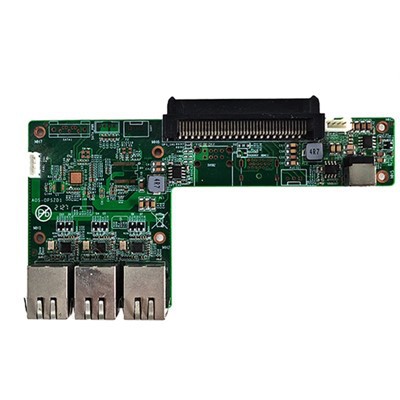
In addition to our standard I3 OPS computers, we also offer a range of accessories and add-ons to enhance the functionality of your device. Our OPS Transfer Board High Performance OPS Adapter Board and High-speed Transmission OPS Switching To Small Board OPS Switching To Small Board 80pin Interface are designed to provide additional connectivity options and improve the performance of your I3 OPS computer.
Conclusion
In conclusion, the presence of a Thunderbolt port in an I3 OPS computer depends on the specific model and its specifications. While not all I3 OPS computers come with Thunderbolt ports, those that do offer significant advantages in terms of high-speed data transfer, multiple display support, and external device connectivity.
If you are in the market for an I3 OPS computer and require high-speed connectivity, we encourage you to explore our range of products and accessories. Our team of experts is available to provide you with more information and help you choose the right solution for your needs.
If you are interested in purchasing an I3 OPS computer or have any questions about our products, please feel free to contact us for a consultation. We look forward to working with you to meet your computing needs.


References
- Intel. (n.d.). Thunderbolt Technology. Retrieved from Intel's official website
- OPS Alliance. (n.d.). Open Pluggable Specification. Retrieved from OPS Alliance's official website