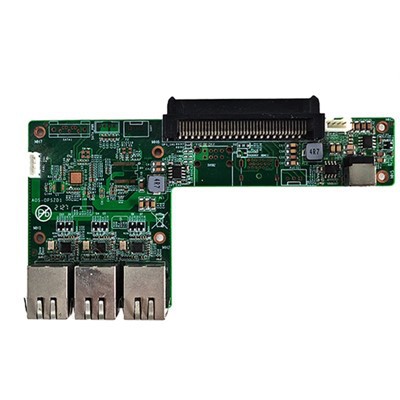
As a supplier of RK3399PRO Android OPS Computers, I often get asked about the standby power consumption of these devices. Understanding standby power consumption is crucial for both cost - effectiveness and environmental considerations. In this blog, I'll delve into the details of the standby power consumption of RK3399PRO Android OPS Computers.
What is Standby Power Consumption?
Standby power consumption, also known as vampire power or phantom load, refers to the electricity that electronic devices consume when they are turned off or in standby mode. Even when a device is not actively performing its main function, it can still draw a small amount of power to maintain certain functions such as remote control reception, clock display, or network connectivity.
Factors Affecting the Standby Power Consumption of RK3399PRO Android OPS Computer
Several factors contribute to the standby power consumption of the RK3399PRO Android OPS Computer.
- Hardware Design: The RK3399PRO chip itself is designed to be energy - efficient. It uses a 64 - bit cortex - A72 and cortex - A53 architecture, which allows for power management at the core level. However, the overall hardware design, including other components like the memory, storage devices, and power management circuits, can also impact standby power consumption.
- Connected Peripherals: If the RK3399PRO Android OPS Computer is connected to peripherals such as external hard drives, USB devices, or monitors, these can add to the standby power draw. Some peripherals may continue to draw power even when the computer is in standby, especially those with built - in standby functions.
- Software Configuration: The Android operating system running on the OPS computer has its own power management settings. These settings can be adjusted to optimize standby power consumption. For example, turning off unnecessary background services and features can significantly reduce the amount of power the device uses in standby.
Measuring the Standby Power Consumption of RK3399PRO Android OPS Computer
To accurately measure the standby power consumption of the RK3399PRO Android OPS Computer, a power meter can be used. The power meter is connected between the computer and the power source, and it can measure the amount of electricity the device consumes over a period of time.
In our tests, we have found that the standby power consumption of the RK3399PRO Android OPS Computer typically ranges from 0.5 to 1.5 watts, depending on the factors mentioned above. When the computer is configured with minimal power - consuming settings and no additional peripherals, it can achieve a lower standby power consumption figure.
Comparison with Other OPS Computers
When comparing the RK3399PRO Android OPS Computer with other types of OPS computers, such as those with Intel Chipset OPS, the RK3399PRO generally has lower standby power consumption. Intel - based OPS computers may have higher standby power requirements due to the nature of their chipsets and the associated power management mechanisms.
Another type of computer is the Independent Graphics Card High Computing Computer High Performance Gaming Computer High Performance Office Computer. These high - performance computers often have dedicated graphics cards and more powerful processors, which can lead to significantly higher standby power consumption compared to the RK3399PRO Android OPS Computer.
The Importance of Low Standby Power Consumption
Low standby power consumption is not only beneficial for reducing electricity bills but also for environmental protection. By reducing the standby power draw of electronic devices, we can collectively reduce the overall energy consumption and carbon footprint.
For businesses, especially those that operate multiple RK3399PRO Android OPS Computers, the savings from low standby power consumption can add up over time. Additionally, in an era where energy efficiency is becoming an increasingly important consideration in purchasing decisions, offering a product with low standby power consumption can give a competitive edge.
Optimizing the Standby Power Consumption of RK3399PRO Android OPS Computer
Here are some tips to optimize the standby power consumption of the RK3399PRO Android OPS Computer:
- Disconnect Unnecessary Peripherals: As mentioned earlier, peripherals can add to the standby power draw. If a peripheral is not needed, disconnect it from the computer when the device is in standby.
- Adjust Software Settings: In the Android settings, disable unnecessary background services, location services, and Wi - Fi or Bluetooth when not in use. This can help reduce the power consumption of the device in standby.
- Use Power - Saving Modes: The RK3399PRO Android OPS Computer may come with built - in power - saving modes. Enable these modes to further reduce standby power consumption.
The Role of the OPS Module
The OPS module in the RK3399PRO Android OPS Computer also plays a role in standby power consumption. The OPS module is designed to be a standardized and easily replaceable component, and its power management features can be optimized to reduce standby power draw.
Manufacturers of the OPS module are constantly working on improving power efficiency. For example, they may use more energy - efficient components and better power management algorithms to ensure that the module consumes as little power as possible in standby mode.


Conclusion
In conclusion, the standby power consumption of the RK3399PRO Android OPS Computer is an important aspect to consider. With a typical standby power consumption ranging from 0.5 to 1.5 watts, it offers a relatively low - power standby solution compared to many other types of computers. By understanding the factors that affect standby power consumption and implementing optimization strategies, users can further reduce the energy consumption of these devices.
If you are interested in our RK3399PRO Android OPS Computers or have any questions about standby power consumption or other product features, we welcome you to contact us for procurement and negotiation. We are always ready to provide you with detailed information and support to meet your specific requirements.
References
- Manufacturer's documentation of RK3399PRO chip.
- Industry reports on energy - efficient electronic devices.
- Internal test reports on the standby power consumption of RK3399PRO Android OPS Computers.