Hey there! As a supplier of UHD OPS Computers for Meeting Boards, I'm super excited to share with you what kind of software usually comes pre - installed on these nifty devices.
First off, let's talk about why pre - installed software matters. When you're setting up a meeting board, you want to get up and running as quickly as possible. Having the right software already on the UHD OPS Computer saves you time and hassle. You don't have to go through the process of finding, downloading, and installing each piece of software separately.
One of the most common types of pre - installed software is the operating system. Most of our UHD OPS Computers come with Windows 10 or Windows 11. These operating systems are well - known for their user - friendly interfaces and wide range of compatibility with other software. They offer a stable platform for running all the other applications you'll need during meetings. With Windows, you can easily connect to the internet, manage files, and run productivity apps.
Next up is presentation software. Microsoft PowerPoint is a classic choice that's pre - installed on many of our systems. It's super easy to use, and most people are familiar with it. You can create eye - catching slideshows, add images, videos, and animations to make your presentations more engaging. Whether you're presenting a new product idea or sharing quarterly reports, PowerPoint has got you covered.
But we don't stop there. We also include some collaboration software. One of the top ones is Microsoft Teams. It's a great tool for remote meetings, file sharing, and real - time collaboration. With Teams, team members can join meetings from anywhere in the world, share their screens, and work together on documents. It has features like chat, video conferencing, and whiteboarding, which are essential for modern meetings.
Another useful piece of software is annotation software. This allows you to mark up presentations, documents, and images during a meeting. You can use a stylus or your finger on the touch - screen meeting board to draw, write, and highlight important points. It's a great way to add interactivity to your meetings and make sure everyone is on the same page.


Now, let's talk about the hardware that these software applications run on. We offer a variety of UHD OPS Computers with different specifications. For example, we have the Intel 4 - 5 Generation CPU 3.5 - inch Industrial Motherboard. This motherboard provides a solid foundation for running all the pre - installed software smoothly. It has enough processing power to handle multitasking, so you can run multiple applications at the same time without any lag.
If you need more advanced performance, we also have the H310 8Th 9Th Generation CORE OPS Computer. This computer is equipped with the latest generation of Intel Core processors, which offer even better speed and efficiency. It's perfect for large - scale meetings where you need to run high - definition videos, complex presentations, and multiple collaboration tools simultaneously.
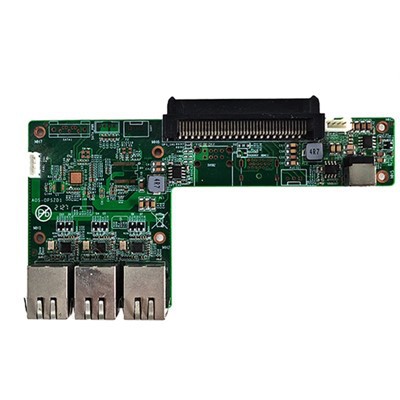
And for those who need a bit more flexibility, we have the Transfer Panel Addtive OPS Computer. This computer allows you to easily transfer data and connect to different devices. It has additional ports and features that make it easier to integrate with other equipment in your meeting room.
In addition to the above - mentioned software, we also pre - install some security software. Antivirus software is a must - have to protect your system from malware, viruses, and other online threats. We usually include well - known antivirus programs that offer real - time protection and regular updates. This ensures that your meeting board computer stays safe and secure, and your sensitive data is protected.
We also install some utility software. For example, disk management tools that help you optimize your hard drive space, system cleaners that remove temporary files and junk, and power management software that helps you save energy. These utilities may seem small, but they can make a big difference in the overall performance and longevity of your UHD OPS Computer.
When it comes to choosing the right UHD OPS Computer for your meeting board, it's important to consider your specific needs. If you're a small team with basic meeting requirements, a computer with standard specifications and the pre - installed software we've mentioned should be sufficient. But if you're a large corporation with complex meeting needs, you may want to opt for a more powerful computer with additional features.
So, if you're in the market for a UHD OPS Computer for your meeting board, we're here to help. We offer high - quality products with a great selection of pre - installed software. Our team of experts can assist you in choosing the right computer for your specific requirements. Whether you need more information about the software, the hardware, or have any other questions, feel free to reach out to us for a procurement discussion. We're looking forward to working with you to make your meetings more productive and efficient.
References
- General knowledge about UHD OPS Computers and meeting board software.
- Product information from our in - house knowledge base.