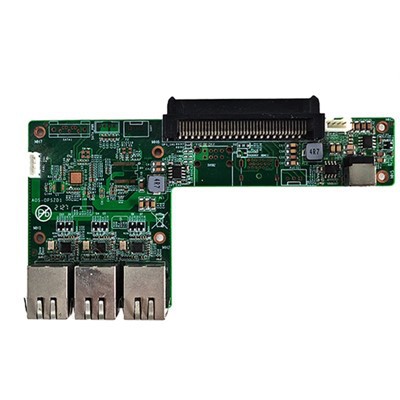
In the dynamic landscape of computing technology, the demand for versatile and powerful devices continues to soar. One such device that has caught the attention of many tech enthusiasts and professionals is the RK3399PRO Android OPS Computer. As a supplier of this remarkable piece of hardware, I often encounter questions about its capabilities, particularly regarding its potential to run virtual machines at a basic level. In this blog post, I will delve into the technical aspects of the RK3399PRO Android OPS Computer and explore whether it can indeed be used for running virtual machines.
Understanding the RK3399PRO Android OPS Computer
Before we dive into the topic of virtual machines, let's first understand what the RK3399PRO Android OPS Computer is. The OPS (Open Pluggable Specification) form factor is designed to provide a standardized and easy - to - integrate solution for various display and computing applications. The RK3399PRO is a high - performance system - on - a - chip (SoC) developed by Rockchip. It features a dual - core Cortex - A72 + quad - core Cortex - A53 CPU architecture, along with a powerful Mali - T860MP4 GPU, offering excellent processing and graphics capabilities.
The Android operating system, on the other hand, is a widely used mobile operating system that has also found its way into many embedded and computing devices. The combination of the RK3399PRO SoC and the Android OS in an OPS form factor makes this computer suitable for a variety of applications, such as digital signage, interactive kiosks, and OPS Computer for Meeting Touchable TV.
Can It Run Virtual Machines?
Running virtual machines requires a certain level of hardware resources and software support. At a basic level, a virtual machine is a software emulation of a computer system that allows multiple operating systems to run on a single physical machine. To run a virtual machine, the host system needs to have sufficient CPU power, memory, and storage, as well as the ability to support virtualization technologies.
Hardware Considerations
The RK3399PRO's CPU architecture provides a good amount of processing power. The dual - core Cortex - A72 cores are designed for high - performance tasks, while the quad - core Cortex - A53 cores can handle lighter workloads efficiently. This multi - core setup allows the system to potentially handle the resource demands of a basic virtual machine.
In terms of memory, the RK3399PRO Android OPS Computer typically comes with a decent amount of RAM, usually ranging from 2GB to 4GB. While this may seem sufficient for basic virtual machine operations, it's important to note that the Android OS itself consumes a significant portion of the available memory. Therefore, the remaining memory for the virtual machine may be limited, which could affect its performance.
Storage is another crucial factor. A virtual machine requires a certain amount of disk space to store its virtual hard drive image. The RK3399PRO Android OPS Computer usually has internal storage options, such as eMMC or SSD. However, the available storage may also be shared with the Android OS and other installed applications, so it's necessary to ensure that there is enough free space for the virtual machine.
Software Considerations
Android, by default, is not designed to run virtual machines in the same way as desktop operating systems like Windows or Linux. It lacks built - in support for traditional virtualization technologies such as VMware or VirtualBox. However, there are some third - party solutions and custom ROMs that can enable virtualization on Android devices.
One approach is to use containerization technologies, which are a lighter form of virtualization. Docker, for example, can be used to create isolated environments on Android. While not a full - fledged virtual machine, Docker containers can run applications in a sandboxed environment, providing a similar level of isolation.
Another option is to use virtualization emulators specifically designed for Android. These emulators can create a virtual environment where a different operating system can run. However, their performance may be limited due to the constraints of the Android OS and the hardware resources.
Use Cases for Basic Virtual Machine Operations
Despite the challenges, there are some use cases where the RK3399PRO Android OPS Computer can be used for basic virtual machine operations.
Testing and Development
For developers, the ability to run a basic virtual machine on the RK3399PRO Android OPS Computer can be useful for testing applications on different operating systems. For example, a developer can create a virtual machine running a different version of Android or a lightweight Linux distribution to test the compatibility of their apps.
Educational Purposes
In an educational setting, the RK3399PRO Android OPS Computer can be used to introduce students to the concept of virtualization. By running a basic virtual machine, students can learn about different operating systems and how they interact with the hardware.
Other Related Products
If the RK3399PRO Android OPS Computer does not fully meet your requirements for running virtual machines, we also offer other products that may be more suitable. The RK3399A Touch Panel Android Motherboard provides a similar level of performance with a different form factor, which may be more flexible for certain applications. Additionally, the H310 8Th 9Th Generation CORE OPS Computer is a more powerful option, based on Intel's H310 chipset, which offers better support for virtualization technologies.
Conclusion
In conclusion, while the RK3399PRO Android OPS Computer has the potential to run basic virtual machines, it comes with certain limitations. The hardware resources, although decent, may be constrained by the Android OS, and the lack of native virtualization support requires the use of third - party solutions. However, for specific use cases such as testing and education, it can still be a viable option.
If you are interested in exploring the possibilities of using the RK3399PRO Android OPS Computer or any of our other products for your virtualization needs, we encourage you to contact us for a detailed discussion. Our team of experts can provide you with more information and help you make an informed decision.


References
- Rockchip RK3399PRO Datasheet
- Android Developer Documentation
- Docker Documentation for Android