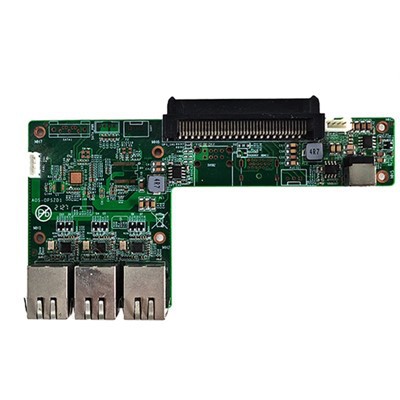
Cleaning a 4K OPS (Open Pluggable Specification) Computer for Touch Panel is a crucial maintenance task that ensures its optimal performance and longevity. As a well - established supplier of 4K OPS Computers for Touch Panels, I'm here to share some professional guidance on how to effectively clean these sophisticated devices.
Understanding the 4K OPS Computer for Touch Panel
Before diving into the cleaning process, it's essential to understand what a 4K OPS Computer for Touch Panel is. These computers are designed to work seamlessly with touch - panel displays, providing high - definition 4K video output and interactive functionality. They are commonly used in various settings such as meeting rooms, educational institutions, and control centers. Their compact OPS form factor allows for easy integration into compatible displays, making them a popular choice for modern digital signage and interactive applications.
Preparation before Cleaning
The first step in cleaning a 4K OPS Computer for Touch Panel is preparation. You need to gather the necessary cleaning materials. Soft microfiber cloths are a must - have as they are gentle on the device's surface and won't scratch it. Additionally, compressed air cans can be used to blow out dust from hard - to - reach areas. Isopropyl alcohol with a concentration of around 70% can be used for disinfecting and removing stubborn stains, but it should be used sparingly.
Before starting the cleaning process, ensure that the device is powered off and unplugged from the power source. This not only prevents the risk of electrical shock but also protects the internal components from potential damage during cleaning.
Cleaning the External Surfaces
The external surfaces of the 4K OPS Computer for Touch Panel are usually the first to accumulate dust and fingerprints. Start by using a dry microfiber cloth to gently wipe the entire exterior of the device. Pay special attention to the areas around the ports and ventilation slots, as these are common dust - collecting spots.
If there are stubborn fingerprints or stains on the surface, dampen a corner of the microfiber cloth with a small amount of isopropyl alcohol. Make sure the cloth is only slightly damp, not wet. Then, carefully wipe the stained area in a gentle, circular motion. Avoid getting any liquid into the ports or ventilation holes, as this could cause short - circuits or damage to the internal components.
Cleaning the Touch Panel
The touch panel is the most interactive part of the device and requires special care. First, use a dry microfiber cloth to remove any loose dust and debris from the touch - panel surface. For a more thorough clean, spray a small amount of a specialized touch - panel cleaner onto the microfiber cloth (never directly on the touch panel). Then, wipe the touch panel in a smooth, even motion from one side to the other.
Avoid using abrasive sponges or cleaners with harsh chemicals, as these can damage the touch - panel's sensitive coating. If you don't have a specialized touch - panel cleaner, a mixture of water and a small amount of mild dish soap can be used as an alternative. But remember to rinse the cloth thoroughly to remove all soap residues before wiping the touch panel.
Cleaning the Internal Components
Cleaning the internal components should be done with extreme caution. If you're not familiar with computer hardware, it's recommended to seek professional help. However, if you decide to clean the insides yourself, start by carefully removing the device's cover using the appropriate tools.


Use a compressed air can to blow out dust from the motherboard, fans, and other internal components. Hold the can upright and keep a safe distance from the components to avoid any damage. You can also use a soft brush to gently remove any dust that the compressed air may have missed.
When cleaning the fans, make sure to clean both the blades and the surrounding areas. Dust accumulation on the fans can reduce their efficiency, leading to overheating issues. Be careful not to touch any electrical connections or delicate components during the cleaning process.
Maintaining Proper Ventilation
Proper ventilation is key to the performance and lifespan of a 4K OPS Computer for Touch Panel. Regularly check the ventilation slots to ensure they are not blocked by dust or other debris. Blocked ventilation can cause the device to overheat, which can lead to component failure and reduced performance.
If you notice that the ventilation slots are clogged, use a compressed air can to blow out the dust. You can also gently use a thin, soft brush to clean the slots. Ensuring that the device is placed in a well - ventilated area can also help maintain proper airflow and prevent overheating.
Importance of Regular Cleaning
Regular cleaning of a 4K OPS Computer for Touch Panel offers several benefits. Firstly, it improves the device's performance by ensuring that the fans can operate efficiently and the internal components are not overheating. Secondly, it enhances the visual experience on the touch panel, as a clean panel provides better clarity and responsiveness. Thirdly, it extends the lifespan of the device by preventing dust and debris from causing long - term damage to the internal components.
As a reputable supplier of 4K OPS Computers for Touch Panels, we also offer a wide range of related products. For instance, you can check out our OPS Computer for Meeting Touchable TV, which is specifically designed for meeting room applications with its excellent touch - screen compatibility. Our ARM Chip Industrial Iot Gateway Internet Of Things Gateway Computer Embedded Computer is another great product that combines the power of IoT technology with embedded computing. And if you're looking for a high - definition solution for meeting boards, our UHD OPS Computer for Meeting Board is an ideal choice.
Contact us for Procurement
If you're interested in purchasing 4K OPS Computers for Touch Panels or any of our other related products, we invite you to contact us for procurement and further discussions. Our team of experts is ready to assist you with your specific needs and provide you with the best solutions.
References
- "Computer Maintenance Best Practices" by Technology Journal Press
- "Guide to Cleaning Electronic Devices" by Electronics Maintenance Institute