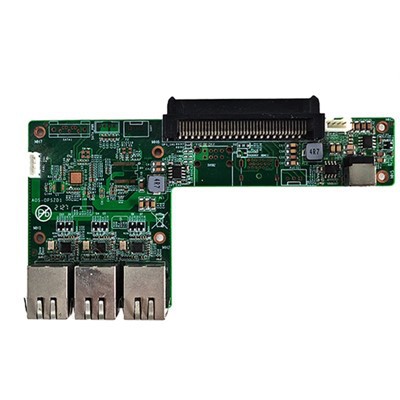
Hey there! As a supplier of the RK3368 Interactive Display Mainboard, I often get asked about how to install the operating system on it. In this blog, I'm gonna walk you through the whole process step by step.
First off, let's talk about why you might want to install an operating system on the RK3368 Interactive Display Mainboard. This mainboard is a pretty powerful piece of hardware, and having the right operating system can really unlock its full potential. Whether you're using it for a digital signage project, a touch - screen kiosk, or something else, the OS is what makes it all work.
Prerequisites
Before you start the installation process, there are a few things you'll need to have on hand.
- A Suitable Operating System Image: You can usually find the official operating system images for the RK3368 on the manufacturer's website. Make sure to choose the one that suits your needs, whether it's Android, Linux, or something else.
- A USB Flash Drive: You'll need a USB flash drive with enough space to hold the operating system image. A 4GB or larger drive should do the trick.
- A Computer: You'll use this computer to prepare the USB flash drive with the operating system image. It can be a Windows, Mac, or Linux machine.
- RK3368 Interactive Display Mainboard: Of course, you need the mainboard itself, along with all the necessary cables and power supply.
Preparing the USB Flash Drive
The first step is to prepare the USB flash drive with the operating system image. Here's how you do it:
- Download the Image: Go to the manufacturer's website and download the operating system image for the RK3368. Save it to your computer.
- Format the USB Flash Drive: Use the disk management tool on your computer to format the USB flash drive. Make sure to choose the FAT32 file system, as it's widely compatible.
- Use a Tool to Write the Image: There are several tools you can use to write the operating system image to the USB flash drive. One popular option is Etcher. It's easy to use and works on all major operating systems.
- Open Etcher.
- Click on "Select image" and choose the operating system image you downloaded earlier.
- Click on "Select target" and choose your USB flash drive.
- Click on "Flash!" and wait for the process to complete.
Installing the Operating System on the RK3368 Mainboard
Once you've prepared the USB flash drive, it's time to install the operating system on the RK3368 Interactive Display Mainboard.
- Connect the USB Flash Drive: Plug the prepared USB flash drive into one of the USB ports on the RK3368 mainboard.
- Power On the Mainboard: Connect the power supply to the mainboard and turn it on. Make sure the mainboard is set to boot from the USB flash drive. You can usually do this by pressing a specific key during the boot process, like F11 or Esc, depending on the mainboard's BIOS settings.
- Follow the Installation Wizard: Once the mainboard boots from the USB flash drive, you'll see an installation wizard. Follow the on - screen instructions to complete the installation. This may include choosing the language, partitioning the hard drive, and setting up user accounts.
Troubleshooting
Sometimes, things don't go as smoothly as planned. Here are some common issues you might encounter and how to fix them:
- Booting Problems: If the mainboard doesn't boot from the USB flash drive, check the BIOS settings to make sure the USB drive is set as the first boot option. Also, make sure the USB flash drive is properly inserted.
- Installation Errors: If you get an error during the installation process, it could be due to a corrupted operating system image. Try downloading the image again and writing it to the USB flash drive.
Other Related Products
If you're interested in other types of computer products, we also have some great options. Check out our Stand - alone OPS Computers The Intel I3 6100U Supports A Variety Of System Stand - alone Computers. These computers are really powerful and can support a variety of systems.
We also offer the H61/B75 CORE Third Generation H42mm OPS - C Computer, which is a great choice for those who need a reliable and compact computer.
And for touch - display applications, our SOH310B Whiskylake Touch Display OPS - C Computer is a top - notch option.
Wrapping Up
Installing the operating system on the RK3368 Interactive Display Mainboard isn't that difficult if you follow the steps I've outlined. It's a great way to get the most out of your mainboard and use it for all sorts of cool projects.
If you're thinking about purchasing the RK3368 Interactive Display Mainboard or any of our other products, we'd love to talk to you. Just reach out to us, and we can have a chat about your needs and how our products can meet them. We're here to help you make the right choice and get the best performance out of your hardware.


References
- Manufacturer's official documentation for the RK3368 Interactive Display Mainboard.
- Etcher official website for USB image writing tool information.