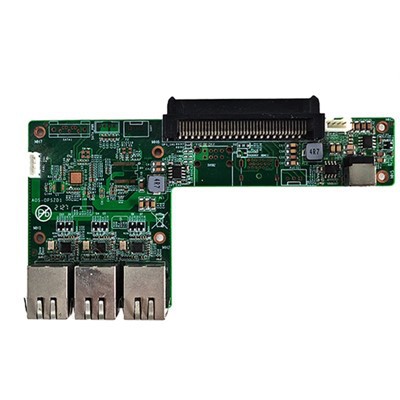
As a supplier of the RK3399PRO Android OPS Computer, I often get asked about its network speed. In this blog, I'll delve into the details of the network capabilities of the RK3399PRO Android OPS Computer, exploring the factors that influence its speed, and comparing it with other relevant products in the market.
Understanding the RK3399PRO Android OPS Computer
The RK3399PRO Android OPS Computer is a powerful and versatile device designed for a wide range of applications, from digital signage to interactive kiosks and smart education. It is built around the RK3399PRO chipset, which offers high - performance computing and graphics capabilities. When it comes to network speed, several components and features play a crucial role.
Network Interface Options
The RK3399PRO Android OPS Computer typically comes with multiple network interface options. One of the most common is the Ethernet port. Ethernet is known for its reliability and high - speed data transfer. Most RK3399PRO Android OPS Computers support Gigabit Ethernet, which means it can theoretically achieve speeds of up to 1000 Mbps (1 Gbps). This is more than sufficient for most business and home - based applications, such as streaming high - definition videos, large - scale data transfers, and online gaming.
In addition to Ethernet, the device also supports Wi - Fi connectivity. Wi - Fi has become an essential part of modern computing, allowing for wireless access to the network. The RK3399PRO Android OPS Computer usually supports the latest Wi - Fi standards, such as Wi - Fi 5 (802.11ac) or even Wi - Fi 6 (802.11ax). Wi - Fi 5 can offer speeds of up to several hundred Mbps, depending on the environment and the number of connected devices. Wi - Fi 6, on the other hand, provides even faster speeds, better performance in congested areas, and lower latency. It can support speeds of over 1 Gbps in ideal conditions.
Factors Affecting Network Speed
However, the actual network speed you can achieve with the RK3399PRO Android OPS Computer is not solely determined by its hardware capabilities. There are several external factors that can have a significant impact on the speed.
-
Network Infrastructure: The quality and capacity of your network infrastructure are crucial. If you are using a Gigabit Ethernet connection, but your router or switch only supports 100 Mbps, then your actual speed will be limited to 100 Mbps. Similarly, for Wi - Fi, the performance of your access point and the number of other devices connected to it can affect the speed. A crowded Wi - Fi network with many devices competing for bandwidth will result in slower speeds for each device.
-
Distance and Obstacles: In the case of Wi - Fi, the distance between the RK3399PRO Android OPS Computer and the access point, as well as the presence of obstacles such as walls and furniture, can weaken the signal strength and reduce the speed. The farther away the device is from the access point, or the more obstacles in between, the lower the signal quality and the slower the connection.
-
Network Congestion: The overall network congestion can also impact the speed. If many users are using the same network at the same time, especially during peak hours, the available bandwidth will be shared among all the users, leading to slower speeds for each individual.
Comparing with Other Products
To better understand the network speed of the RK3399PRO Android OPS Computer, let's compare it with some other relevant products in the market.
RK3399A Touch Panel Android Motherboard
The RK3399A Touch Panel Android Motherboard, like the RK3399PRO Android OPS Computer, is based on the RK3399 series chipsets. It typically offers similar network capabilities in terms of Ethernet and Wi - Fi speeds. However, the specific implementation and the performance may vary slightly depending on the design and the components used on the motherboard. In general, both devices are well - equipped to handle high - speed network connections for various applications.
HM86 Discrete Graphics Electronic Whiteboard OPS Computer
The HM86 Discrete Graphics Electronic Whiteboard OPS Computer is another product in the OPS computer category. While it may have different focus areas, such as enhanced graphics capabilities for the electronic whiteboard, its network speed is also an important factor. In terms of network interfaces, it may also offer Gigabit Ethernet and Wi - Fi connectivity. However, the overall computing power and the specific networking hardware used may influence its real - world network performance compared to the RK3399PRO Android OPS Computer.
Intel J6412 Processor MINI Computer 2COM Port 6USB Mini Computer
The Intel J6412 Processor MINI Computer comes with its own set of network features. It typically offers similar Ethernet and Wi - Fi options. The main difference lies in the underlying processor architecture and the overall system design. The Intel - based system may have different performance characteristics, especially in terms of CPU - related network processing tasks. However, in terms of raw network speed, both the RK3399PRO Android OPS Computer and the Intel J6412 Processor MINI Computer can achieve comparable speeds under ideal conditions.
Tips to Optimize Network Speed
If you are using the RK3399PRO Android OPS Computer and want to get the best possible network speed, here are some tips:
-
Check Your Network Infrastructure: Make sure your router, switch, and other network devices support high - speed connections. If possible, upgrade to a Gigabit Ethernet router or a Wi - Fi 6 access point for faster speeds.
-
Optimize Wi - Fi Placement: Place your access point in a central location to ensure maximum coverage. Avoid placing it near metal objects or other sources of interference.
-
Limit Connected Devices: Reduce the number of devices connected to your network, especially during peak usage hours. This will free up more bandwidth for the RK3399PRO Android OPS Computer.
-
Update Drivers and Firmware: Regularly update the network drivers on the RK3399PRO Android OPS Computer and the firmware of your network devices. This can improve performance and fix any known issues.
Conclusion
The RK3399PRO Android OPS Computer offers excellent network speed capabilities, with support for Gigabit Ethernet and modern Wi - Fi standards. While the theoretical speeds are quite high, the actual performance can be affected by various factors such as network infrastructure, distance, and congestion. By understanding these factors and taking appropriate measures to optimize the network, you can ensure that the device operates at its best.
If you are interested in purchasing the RK3399PRO Android OPS Computer or have any questions about its network speed or other features, feel free to contact us for further discussions. We are more than happy to assist you in making the right choice for your specific needs.


References
- General knowledge about networking and computer hardware.
- Product specifications of the RK3399PRO Android OPS Computer, RK3399A Touch Panel Android Motherboard, HM86 Discrete Graphics Electronic Whiteboard OPS Computer, and Intel J6412 Processor MINI Computer.