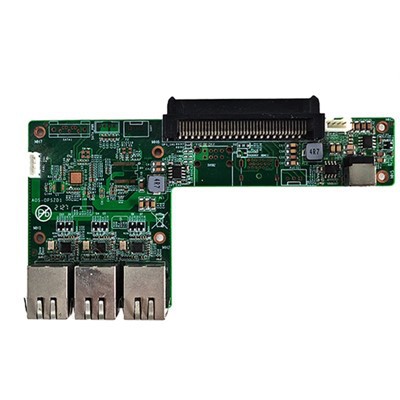
Hey there! As a supplier of RK3288 Android OPS Computers, I often get asked whether these nifty little machines are suitable for office work. Well, let's dive right in and break it down.


What's the RK3288 Android OPS Computer?
First off, for those who aren't in the know, the RK3288 Android OPS Computer is a compact, powerful device. It runs on the Android operating system and is based on the RK3288 processor. This processor is known for its decent performance, offering a good balance between power and energy efficiency. It's small enough to fit in the palm of your hand, yet it packs a punch that can handle a variety of tasks.
Performance for Office Tasks
When it comes to office work, the most common tasks include word processing, spreadsheet management, and email handling. The RK3288 Android OPS Computer can handle these tasks like a champ. For word processing, apps like Google Docs or WPS Office work smoothly on it. You can create, edit, and format documents without any major lag. The processor has enough power to handle text formatting, spell - checking, and even inserting images into your documents.
Spreadsheets are also no problem. Whether you're working on simple budget sheets or more complex financial models, apps like Google Sheets can run efficiently. The device can handle calculations and data sorting without causing you to pull your hair out waiting for results.
Email is a breeze too. You can connect multiple email accounts, check your inbox, send and receive messages, and even manage your contacts. The Android interface makes it easy to navigate through different email clients and perform all the necessary functions.
Multimedia and Presentation
In an office setting, multimedia and presentations are often part of the deal. The RK3288 Android OPS Computer has excellent multimedia capabilities. It can play high - definition videos smoothly, which is great for showing product demos or training videos during meetings.
When it comes to presentations, apps like Google Slides or Microsoft PowerPoint (if available on Android) work well. You can create eye - catching slideshows with images, videos, and animations. The device can connect to projectors easily, allowing you to share your presentations with your colleagues or clients without any hassle.
Connectivity
Connectivity is crucial in an office environment. The RK3288 Android OPS Computer offers a range of connectivity options. It has Wi - Fi, which allows you to connect to the office network easily. You can access shared drives, cloud storage, and other online resources without any issues.
It also has USB ports, which are useful for connecting external devices such as keyboards, mice, and flash drives. You can transfer files between your computer and other devices quickly and easily. Some models even support Bluetooth, so you can connect wireless headphones or speakers for a more private or immersive experience.
Cost - Effectiveness
One of the biggest advantages of the RK3288 Android OPS Computer for office work is its cost - effectiveness. Compared to traditional desktop computers or laptops, it's much more affordable. This is great for small businesses or startups that are looking to equip their offices with computers without breaking the bank.
You can get a fully functional RK3288 Android OPS Computer at a fraction of the cost of a high - end PC. And since it consumes less power, you'll also save on electricity bills in the long run.
Comparison with Other Options
Now, let's compare the RK3288 Android OPS Computer with some other popular office computer options. For example, the I3 6100U/I5 6200U/I7 6500U CPU MINI Computer 4GB DDR4 2133MHz Computer. These mini - computers are powered by Intel processors and offer high - end performance. However, they come with a higher price tag. If your office work mainly consists of basic tasks, the RK3288 Android OPS Computer can be a more cost - effective choice.
Another option is the RK3399A Touch Panel Android Motherboard. The RK3399A is a more powerful processor compared to the RK3288. It offers better performance for more demanding tasks such as gaming or heavy - duty video editing. But for regular office work, the RK3288 is more than sufficient and is also more affordable.
The Intel J6412 Processor MINI Computer 2COM Port 6USB Mini Computer is also a good option. It has a decent processor and offers a good set of connectivity options. However, like the Intel - powered mini - computers mentioned earlier, it's more expensive than the RK3288 Android OPS Computer.
Limitations
Of course, the RK3288 Android OPS Computer isn't without its limitations. If your office work involves running resource - intensive software such as Adobe Photoshop or AutoCAD, it might struggle. These types of applications require a lot of processing power and memory, which the RK3288 may not be able to provide.
Also, some specialized software that is only available for Windows may not work on the Android - based RK3288. So, if your office relies heavily on Windows - only software, you may need to look for other options.
Conclusion
Overall, the RK3288 Android OPS Computer is a great choice for office work, especially for basic to moderately complex tasks. It offers good performance, excellent connectivity, and is very cost - effective. If your office work mainly involves word processing, spreadsheet management, email handling, multimedia presentations, and other common tasks, this computer can meet your needs.
If you're interested in learning more about our RK3288 Android OPS Computers or are thinking about making a purchase, feel free to reach out to us for a detailed discussion. We'd be more than happy to assist you in finding the right solution for your office.
References
- Android Developer Documentation
- RK3288 Processor Technical Specifications
- Office Application User Guides